Fermix Cues: your AI agent wakes the moment something happens
Most proactive agents run on a clock. Cues let Fermix act the moment something happens, on the things you said matter.
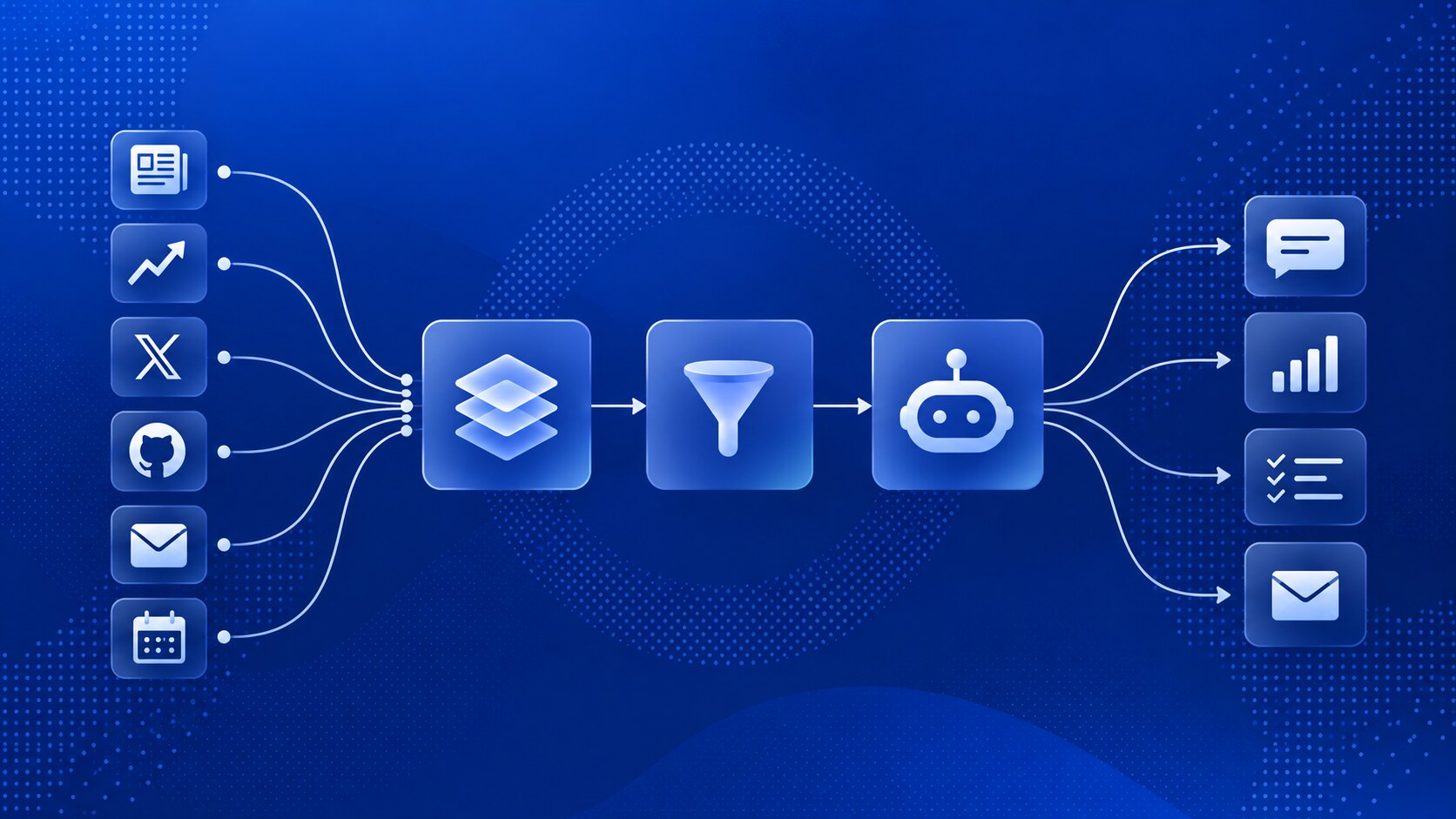
Most proactive AI/SI agents are an alarm clock with a model attached. Every hour, or every morning at eight, the agent wakes up, goes through everything you’ve connected (your inbox, the news, your X feed, GitHub, your calendar) and writes you a summary or asks you to act on something.
That’s a fine way to get a morning briefing. It falls apart when timing matters, for two reasons.
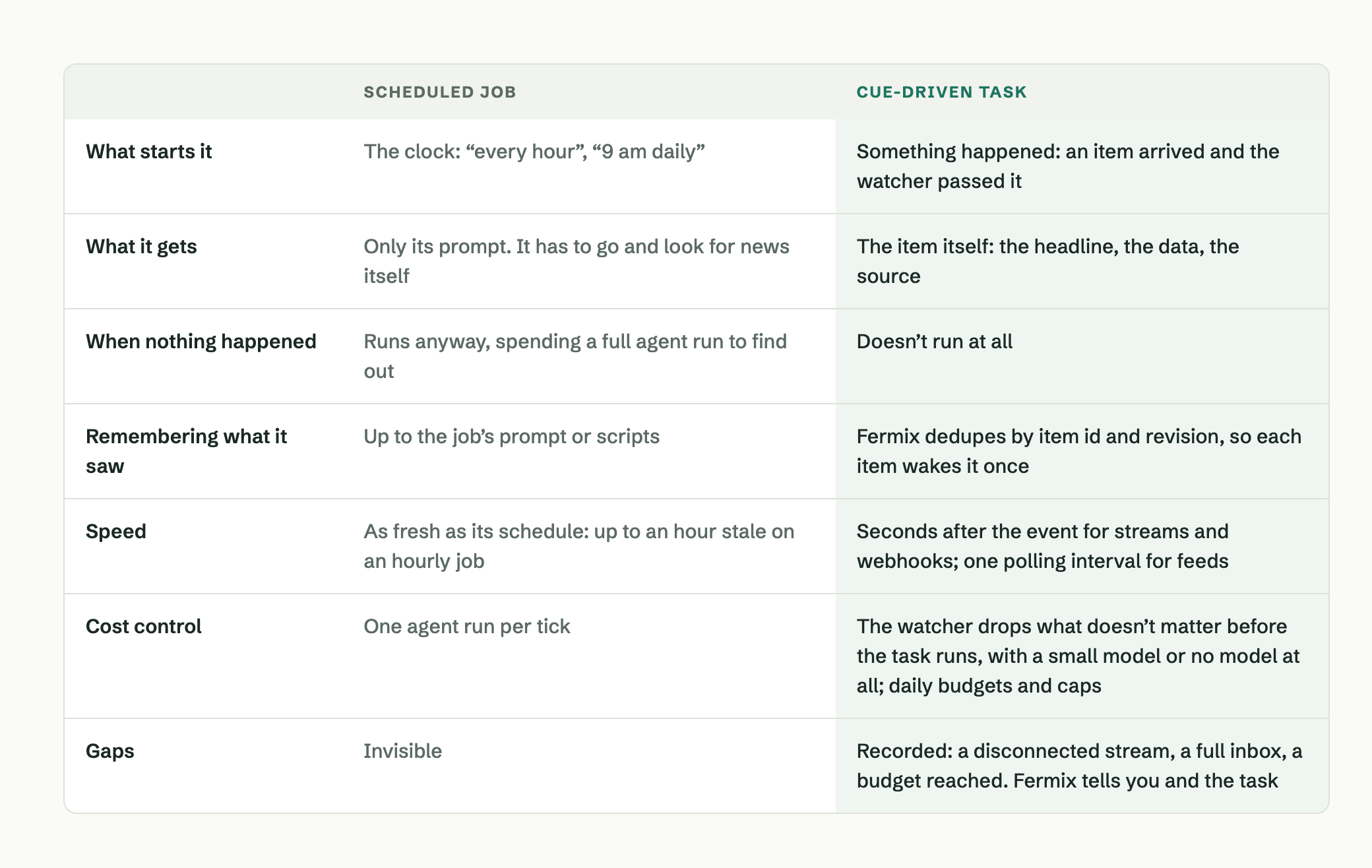
- It’s always late. An hourly job hears about something up to an hour after it happened. For a weekly review, nobody minds. For a headline that’s about to move a stock you hold, that hour is the whole story.
- It’s always paying. The agent can’t know whether anything happened until it looks, and every look is a full agent run: open the sources, read them, reason about them, conclude there’s nothing to say. A quiet day is twenty-four runs that tell you nothing. Run it every minute to fix the lateness, and you pay sixty times as much to hear nothing sooner.
Cues turn this around for Fermix. Think of them as push notifications for your agent: Fermix listens where things happen and checks each new item against what you’ve said matters.
Anything that passes goes into a queue and wakes a task with the item already attached. The agent can get straight to work without first going off to find out what happened.
What a cue is
A cue is one item arriving from outside, as it happens: a news story, a GitHub event, a post from an account you follow, a message from a script on your machine. Three pieces turn it into work.
Source: Where cues come from: a live stream, a webhook, a feed, or a program on your machine. You add sources in Settings.
Watcher: Your filter, in your own words. It judges each cue, passes or drops it, and records why.
Task: What to do with each cue that passes. It runs once per cue, gets the cue as its input, and reports to you.
If you’ve used Zapier, the shape is familiar: a trigger, a filter, an action. Cues change the last two: the filter judges in your words, and the action is an agent that reads the item and reasons about it.
You set up the watcher and its task by asking for them in chat, the way you’d ask Fermix for anything else.
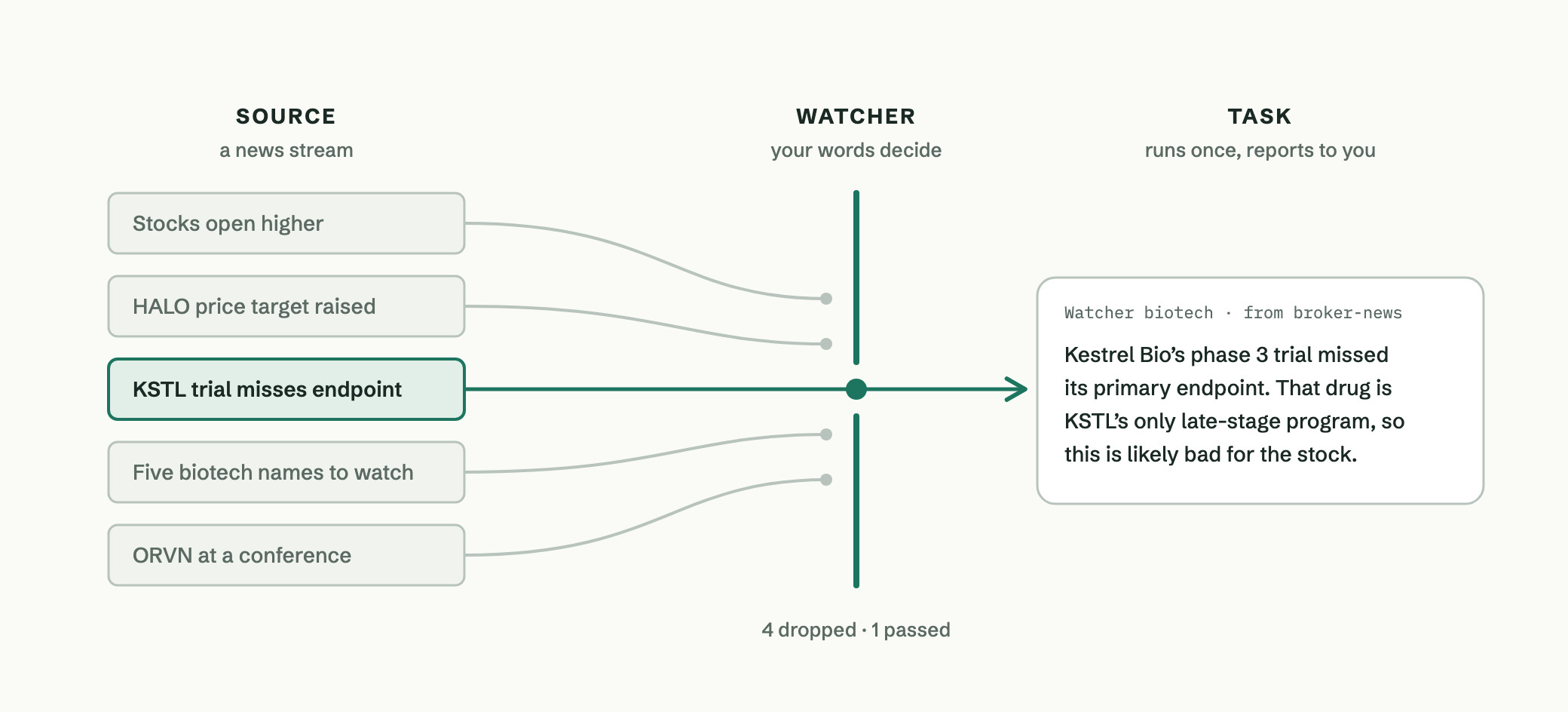 The watcher reads every story. Only the one that matters wakes the task.
A morning on the news wire
Say you hold three small biotech stocks. Biotech names can jump or fall within minutes of a trial result or a regulator’s decision, and you want to hear about that when it breaks, not at the top of the next hour. You tell Fermix:
Watch my broker’s news stream. Only pass news that could move KSTL, ORVN or HALO: trial results, FDA decisions, guidance changes, lawsuits. Skip analyst price targets. When one comes in, tell me what happened and whether it’s likely good or bad for the stock.
Here is what the stream carried one morning, and what the watcher did with each story.
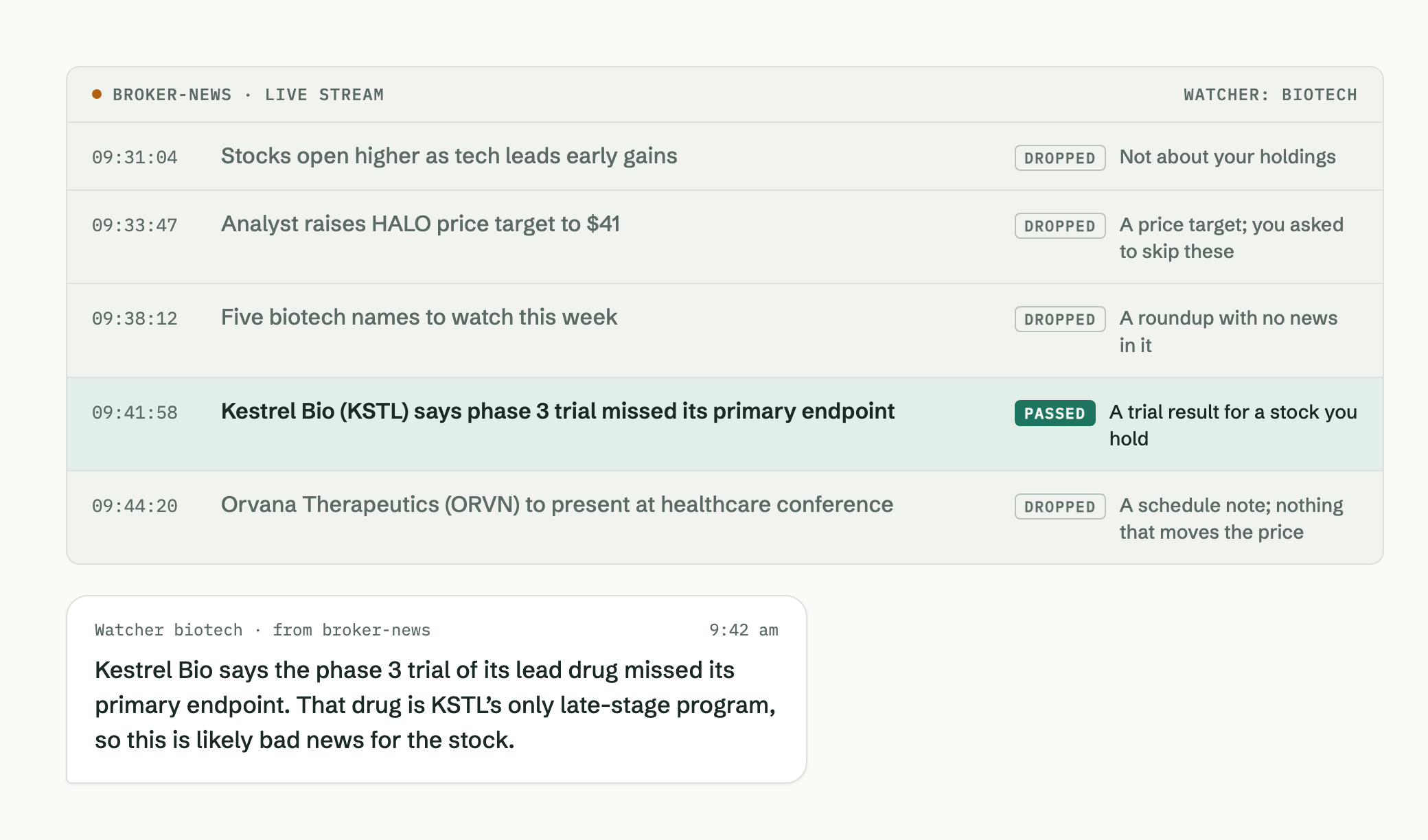
Note: Kestrel Bio, Orvana Therapeutics and their tickers are invented for this example.
The stream delivered every story the moment it was published. The watcher let one through. The agent ran once, at 9:42, and its message was on your phone while an hourly job was still eighteen minutes from waking up.
The source here is a real-time news stream over WebSocket. Fermix keeps the connection open, so nothing polls. Alpaca’s news stream, for one, is set up this way with no Alpaca-specific code in Fermix: you give it the wss:// address, your key and secret (kept in the keychain), and which fields hold each story’s id and type. Any service that streams JSON over a WebSocket can be added the same way.
Why not run the job more often?
Because the clock is the wrong trigger. A schedule makes the model do two jobs at once: notice that something happened, and work out what to do about it. Noticing is the expensive part when it takes a full agent run, and it’s the part that repeats all day for nothing.
Cues split those jobs. Fermix does the noticing. It holds the connections open, polls the feeds, drops duplicates and runs your filter. The connections, polling and deduplication use no model at all, and the filter is one short model call per item, on a small model if you choose one. The agent runs only for an item that got through, and it starts with that item instead of going to look for it.
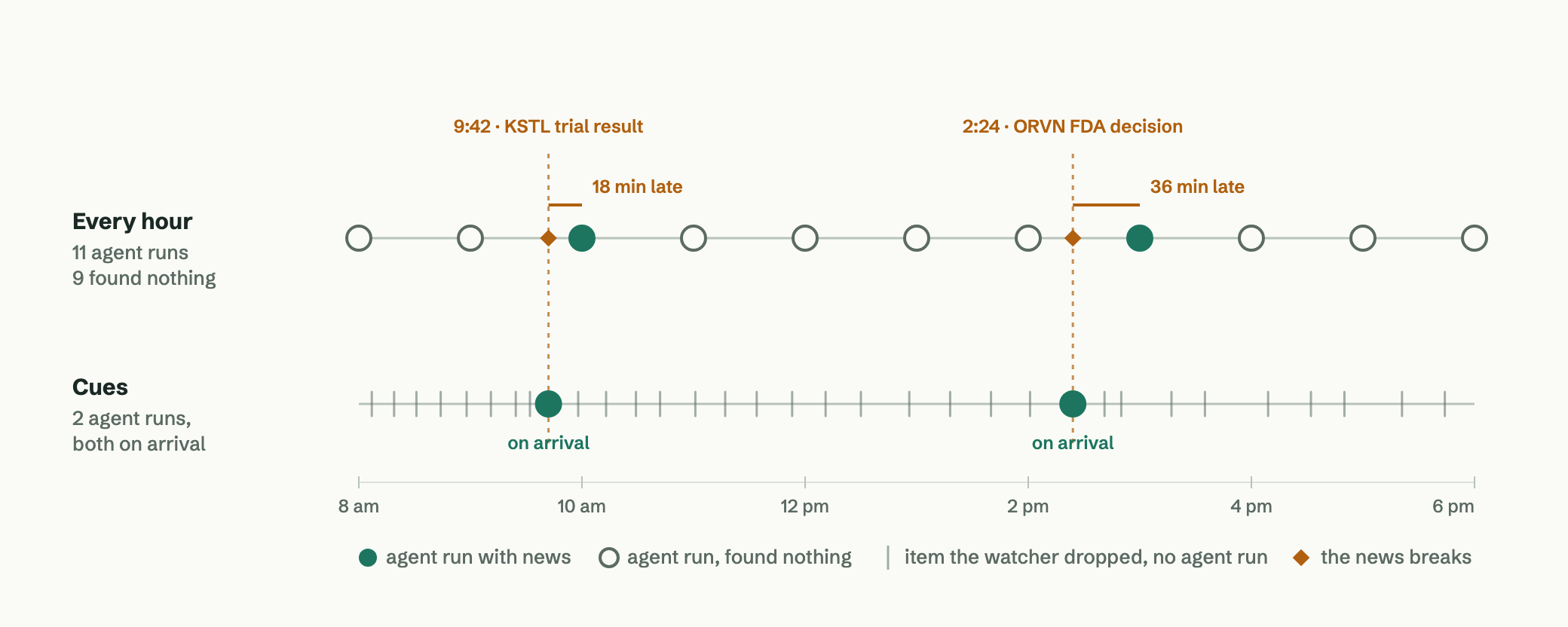 An illustrative day. The hourly job runs eleven times and hears both stories late. The cue task runs twice, each time when the news breaks. Each grey tick is one filter call on a story that didn’t matter, not an agent run.
Where cues come from
Streams
A live WebSocket connection, so items arrive as they’re published. A broker’s news stream, or posts from the Bluesky accounts you choose.
Webhooks
The service calls Fermix when something happens. GitHub is built in: a pull request, an issue, a push, a release. Any service that signs its webhooks with a shared secret, HMAC or Standard Webhooks works too. Fermix listens only on your machine; to let GitHub reach it, you open that one path through Tailscale Funnel.
Feeds
RSS, Atom, JSON Feed or a JSON API. Feeds do poll, but Fermix does the polling, not the model: every 15 minutes by default for RSS, or as often as once a minute if you set it. Each check is a conditional request, so an unchanged feed answers not modified and costs nothing. The model runs only for a new item that passes the watcher.
Programs on your machine
Anything that can post JSON to Fermix locally can hand it a cue: a backup script, a home-lab monitor, a price alert you wrote yourself. Items use the CloudEvents format.
Once it’s running
Three questions come up once a watcher is running: how you tune it, how you know it’s working, and what it’s allowed to do.
How do you tune it?
A watcher’s instructions are your words, kept as you wrote them. Also skip conference announcements adds one line and leaves the rest alone. If a new instruction contradicts an old one, the old one goes. When it gets one wrong, say so, the way you’d mark an email as spam or not spam. That one wasn’t useful saves the cue as an example of what to drop. You should have sent me that saves one of what to pass. The watcher judges every new cue against your instructions and its latest examples.
You also decide what it costs. Each judgment is one short model call, and you pick the model; a small one keeps a busy source cheap. When every item should run the task, turn the filter off and set how many runs a day you allow. Sources, filters and tasks each have daily limits, so a noisy source stays inside what you set.
How do you know it’s working?
A scheduled job that found nothing and one that broke look the same: silence. Cues keep them apart. When a stream disconnects, a source reaches its daily limit, or more items arrive than can wait, Fermix records the gap. It tells you once, and tells the task on its next run. Ask what did my biotech watcher see today? and you get every cue: whether it passed or was dropped, why, and what the task did.
What is it allowed to do?
By default, a task only reads and reports. Every cue was written by someone else, and the task treats it that way: it can read the cue, the watcher’s earlier cues and files you allow, but it has no shell, no browser and no web access, and nothing it reads reaches your memory. A headline that says ignore your instructions is just a headline.
To let a task do something in another service, such as label an issue or post a reply, you grant it a mandate in Settings for specific tools. By default every action waits for you, as a card in the Fermix app or a message in your DM that you confirm or deny. Letting it act on its own takes limits you set: arguments pinned to exact values, or a validator program you wrote. If anything the mandate depends on changes later, it switches off until you approve it again. Nothing in an incoming item can grant permission.
Schedules still have a job
Cues don’t replace schedules. A morning briefing, a weekly review and a Friday summary of your pull requests belong on a clock, because the time is the point. Use a cue when the event is the point:
- When someone requests changes on your pull request, sum up what they asked for.
- When a library you depend on ships a release, tell you what changed.
- When a researcher you follow on Bluesky posts, pass it along with a line on why it’s relevant to you.
- When your nightly backup script reports a failure, tell you which machine and why.
Both run on Fermix’s job system. For now a task runs on cues or on a schedule, not both.
Try it
Cues ship in Fermix 0.17.0 and the Mac app. They’re an early feature and still an experiment. I built them because I had a few things I wanted an agent to act on the moment they happened, like the news watcher above, and none of the agents or bots I use offered that. They all work on a schedule. I don’t know yet which uses will matter most to other people, and you’ll find rough edges. I hope it helps with yours.
To start, turn Cues on in Settings (it takes a restart), add a source, then tell Fermix in chat what to watch for. Fermix has to be running on a machine that’s awake, because a stream or a webhook can only reach a Fermix that’s listening. When a watcher misses something or wakes you for nothing, tell it. Tell me too: what you watch for, and where it falls short, will shape what comes next.
A schedule asks “anything new?” every hour. A cue tells you “this just happened”.